Quick Summary
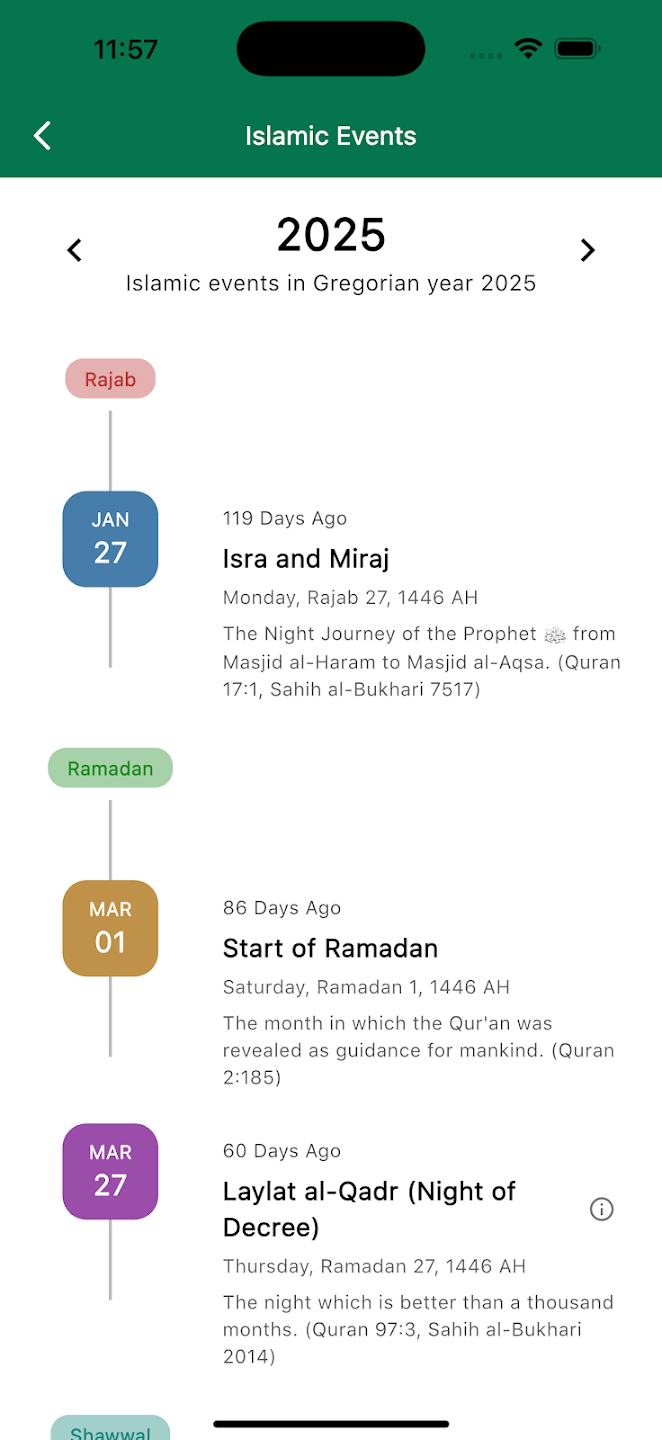
Tawhid’s Islamic Events screen shows a timeline of major Islamic events for a chosen Gregorian year (e.g. 2026). You see the year with left/right arrows to change it, and the subtitle “Islamic events in Gregorian year 2026”. Events are grouped by Islamic month (e.g. Rajab, Ramadan, Shawwal) with colored labels. Each entry has a Gregorian date (e.g. JAN 16, FEB 18, MAR 16), event name, Islamic date (e.g. Friday, Rajab 27, 1447 AH), a description with Quran and Hadith references, and sometimes an info (i) icon for more detail. Past events may show “30 Days Ago” or similar. This guide walks you through every part of the feature.
Why Islamic Events Matter
The Islamic (Hijri) calendar is lunar, so key dates shift each Gregorian year. Knowing when Ramadan starts, when Laylat al-Qadr falls, and when Eid and other events occur helps you plan worship, travel, and family time. Tawhid’s Islamic Events brings these dates into one timeline with both calendars and brief explanations with Quran and Hadith so you can learn and prepare.
Step 1: Opening Islamic Events
To access Islamic Events in Tawhid:
- Open the Tawhid app and go to Islamic Events (from the main menu or settings)
- You will see the Islamic Events screen with a green header: Back arrow (left) and title Islamic Events (center)
- Below the header is the year and the events timeline
Step 2: Year Navigation
The screen shows events for one Gregorian year at a time.
- Year display: The selected year (e.g. 2026) is shown in large, bold text
- Left arrow: Tap to view events for the previous year (e.g. 2025)
- Right arrow: Tap to view events for the next year (e.g. 2027)
- Subtitle: Below the year, text such as “Islamic events in Gregorian year 2026” confirms which year you’re viewing
Step 3: Understanding the Timeline Layout
Events are shown in a vertical timeline. Each block has a clear structure.
Islamic Month Labels
Events are grouped under Islamic month labels (e.g. Rajab, Ramadan, Shawwal). Each label appears in a rounded, pastel-colored bar so you can see at a glance which month an event belongs to. The timeline line connects the date blocks to the event text.
Gregorian Date Block
Each event has a date block on the timeline showing the Gregorian date:
- Abbreviated month (e.g. JAN, FEB, MAR)
- Day number (e.g. 16, 18)
- Blocks may use different colors (e.g. blue, brown, purple) for visual separation
Event Details (Right Side)
- Timing (optional): For past events, text like “30 Days Ago” may appear
- Event name: Bold title (e.g. Isra and Miraj, Start of Ramadan, Laylat al-Qadr (Night of Decree))
- Islamic date: Full Hijri date (e.g. Friday, Rajab 27, 1447 AH; Wednesday, Ramadan 1, 1447 AH; Monday, Ramadan 27, 1447 AH)
- Description: A short explanation of the event’s significance, often with Quran and Hadith references (e.g. Quran 17:1, Sahih al-Bukhari 7517; Quran 2:185; Quran 97:3, Sahih al-Bukhari 2014)
- Info icon (i): Some events have a circled (i) icon—tap it for extra detail or a tooltip
Step 4: Example Events in 2026
Typical events you’ll see on the timeline include:
Isra and Miraj (Rajab 27)
Gregorian: e.g. January 16, 2026
Islamic date: Friday, Rajab 27, 1447 AH
Description: The Night Journey of the Prophet (peace be upon him) from Masjid al-Haram to Masjid al-Aqsa. (Quran 17:1, Sahih al-Bukhari 7517)
Start of Ramadan (Ramadan 1)
Gregorian: e.g. February 18, 2026
Islamic date: Wednesday, Ramadan 1, 1447 AH
Description: The month in which the Qur’an was revealed as guidance for mankind. (Quran 2:185)
Laylat al-Qadr (Night of Decree)
Gregorian: e.g. March 16, 2026 (often one of the odd nights in the last ten days of Ramadan)
Islamic date: e.g. Monday, Ramadan 27, 1447 AH
Description: The night which is better than a thousand months. (Quran 97:3, Sahih al-Bukhari 2014)
This event often has an info (i) icon for more on how to observe it.
Shawwal and Beyond
Further down the timeline you’ll see Shawwal (e.g. Eid ul-Fitr) and other months with events such as Eid ul-Adha, Islamic New Year, and Ashura. Scroll to see the full year.
💡 Pro Tip
Use the year arrows at the start of each Gregorian year to load the next 12 months of Islamic events. Combine Islamic Events with Tawhid’s Ramadan timings and Duas so you’re ready for Ramadan, Laylat al-Qadr, and Eid.
Best Practices
- Check the timeline early: Look at Islamic Events before Ramadan and Eid so you know exact dates in your region
- Use the info icon: Tap (i) on events like Laylat al-Qadr for guidance on worship and significance
- Note both calendars: Gregorian dates help with planning; Hijri dates help with religious context
- Cross-reference with Ramadan: Use Tawhid’s Ramadan section for Suhoor/Iftar and Duas alongside the events timeline
Common Questions
Why do Islamic event dates change each year?
The Islamic calendar is lunar (about 354 days), while the Gregorian calendar is solar. So Ramadan, Eid, and other events move earlier by roughly 10–11 days each Gregorian year. Tawhid’s Islamic Events shows the calculated dates for the year you select; actual dates may vary by a day depending on moon sighting in your region.
What is Laylat al-Qadr?
Laylat al-Qadr (Night of Decree) is the night when the Quran was sent down (Quran 97:1). It is described as better than a thousand months (Quran 97:3) and is observed in the last ten nights of Ramadan, often on an odd night (21st, 23rd, 25th, 27th, or 29th). Use the info (i) icon on that event in Tawhid for more detail.
Conclusion
Tawhid’s Islamic Events gives you a clear timeline of key Islamic dates—Isra and Miraj, Start of Ramadan, Laylat al-Qadr, Eid, and more—with Gregorian and Hijri dates and short descriptions with Quran and Hadith references. Use year navigation to plan ahead and the info icon to learn more. Together with Ramadan timings and Duas, Islamic Events keeps you connected to the Islamic calendar all year.
Ready to See the Islamic Calendar?
Download Tawhid app and open Islamic Events for the full timeline of Ramadan, Eid, Isra Miraj, Laylat al-Qadr, and more.
Related Articles
Ramadan 2026: Suhoor, Iftar & Ashra Duas
Use Ramadan timings and Duas with Islamic Events for a full Ramadan experience.
Read more →
Essential Duas: Morning, Evening & More
Duas for Ramadan, Laylat al-Qadr, and daily worship.
Read more →
How to Set Up Accurate Prayer Times
Prayer times and Islamic calendar in one app.
Read more →
Complete Guide to Reading Quran
Quran 17:1, 97:3, and more—read the verses referenced in Islamic Events.
Read more →