Quick Summary
Tawhid’s Ramadan section gives you: Ramadan Timings (daily Suhoor and Iftar with Set Timings and Ramadan Date Adjustment for regions that start earlier or later); Ramadan Duas (list of 30 duas, one per day); Ashra Duas (duas for the First Ashra—Days of Mercy & Blessings—Second Ashra—Days of Forgiveness—and Third Ashra); and Duas for Suhoor and Iftar (supplications at the beginning and end of the fast). Use Download, Share, and Settings from the timings screen to save or share your schedule. Get ready for Ramadan 2026.
Why Prepare for Ramadan 2026 in Tawhid Now
Ramadan is the month of fasting, prayer, and reflection. Having accurate Suhoor and Iftar times, plus the right duas for each part of the month, helps you focus on worship instead of searching for timings or supplications. Tawhid brings Ramadan timings (based on your location and optional date adjustment), 30 daily Ramadan duas, Ashra duas for the three phases of the month, and specific duas for Suhoor and Iftar into one app—so you can start Ramadan 2026 fully prepared and reach the maximum number of people when you share your schedule and duas.
Step 1: Opening the Ramadan Section
To access Ramadan features in Tawhid:
- Open the Tawhid app and go to the Ramadan section (from the main menu or navigation)
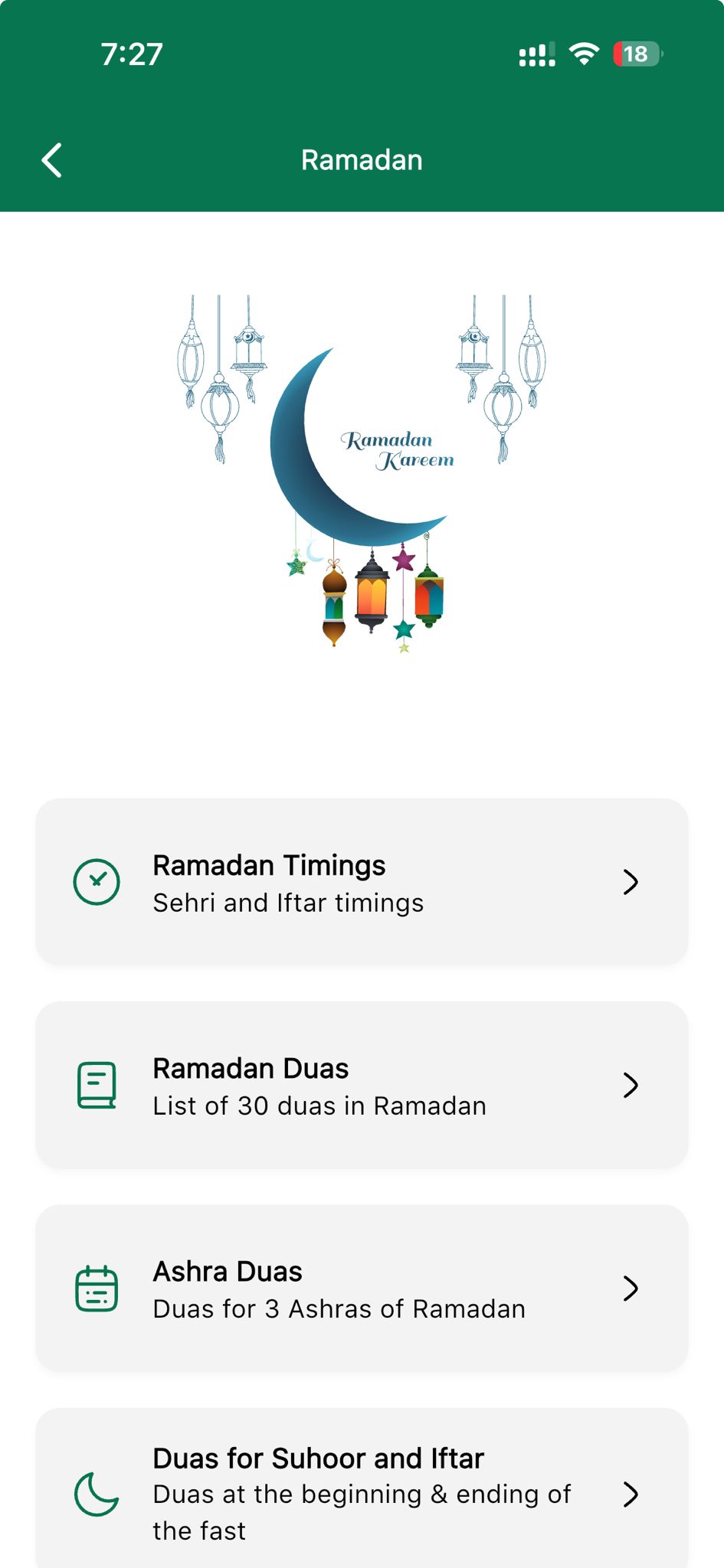
- You will see the Ramadan hub with a Ramadan Kareem–style graphic (crescent, lanterns) and four main cards
- The four sections are: Ramadan Timings, Ramadan Duas, Ashra Duas, and Duas for Suhoor and Iftar
- Tap any card to open that feature
Step 2: Ramadan Timings (Suhoor & Iftar Schedule)
Ramadan Timings show your daily Suhoor (Sehri) and Iftar times for the whole month. This is essential for knowing when to start and break your fast.
What You See on the Timings Screen
- Header: Back arrow, Ramadan and 2026 (with dropdown to change year), and icons for Download, Share, Edit/Sync, and Settings
- Table columns: Ramadan (day number 01, 02, …), Date (e.g. Feb 18 Wednesday), Suhoor (e.g. 5:33 AM), Iftar (e.g. 6:20 PM), Fasting (radio button or checkbox to mark if you fasted that day)
- Times shift gradually through the month (e.g. Suhoor earlier, Iftar later as days lengthen)
Set Timings (Adjust Suhoor & Iftar by Minutes)
If your local mosque or community uses slightly different times, you can fine-tune them:
- Open Set Timings (from the timings screen or menu)
- Suhoor: Use minus (➖) and plus (➕) to adjust the Suhoor time by minutes (e.g. 0, ±5, ±10)
- Iftar: Same controls to adjust Iftar by minutes
- Tap Save to apply. Your table will reflect the new times
Ramadan Date Adjustment (Region-Specific Start)
Different regions may start Ramadan one or two days earlier or later based on moon sighting or calculation. Tawhid lets you align the schedule with your region:
- Open Ramadan Date Adjustment (from Settings or the timings screen)
- Message: “Use this setting if your region starts Ramadan earlier or later.”
- Options: -2 day, -1 day, No adjustment (Default), +1 day, +2 day
- Select the option that matches your local start date. Example: “In Canada some years Ramadan starts 1 day earlier → set -1”
Download, Share, and Fasting Tracker
- Download: Save your Ramadan schedule (e.g. PDF or image) for offline use or printing
- Share: Send the schedule to family and friends so they have the same Suhoor and Iftar times
- Fasting: Use the Fasting column to mark each day you fasted—helps you track your month and stay consistent
The Fasting Tracker is not only for Ramadan—it runs all year:
- Sunnah fasts are marked on the calendar automatically, including every Monday and Thursday
- Qada counter keeps a running total of the make-up fasts you still owe, so days missed in Ramadan are not forgotten once the month ends
- Upcoming fasting days are listed ahead of time, so you know what is coming before the day arrives
- A yearly total shows how many fasts you have kept, alongside your prayer tracker and streak
- See our full list of Sunnah fasting days — the White Days, Mondays and Thursdays, Ashura, Arafah and the six of Shawwal
Step 3: Ramadan Duas (30 Daily Duas)
Ramadan Duas in Tawhid provide a dedicated supplication for each day of Ramadan—30 duas in total.
How It Works
- Tap Ramadan Duas from the Ramadan hub
- You will see entries like “Dua for the Ramadan day 1”, “Dua for the Ramadan day 2”, and so on
- Each entry shows: a number in a circle (1, 2, 3…), the Arabic text of the dua, transliteration (e.g. Allahumma ajʿal Siyami fihi Syama as-Saʾimin…), and the English translation (e.g. “O Allah, on this day make my fasts the fasts of those who fast (sincerely)…”)
- A Share icon at the bottom right lets you share that day’s dua
Recite the daily dua each morning or evening to add structure and meaning to your Ramadan.
Step 4: Ashra Duas (Duas for the Three Ashras)
Ramadan is divided into three Ashras (ten-day periods). Tawhid provides a specific dua for each Ashra, with Arabic, transliteration, English, and a share option.
First Ashra – Days of Mercy & Blessings
Theme: First Ashra – Days of Mercy & Blessings
Arabic:
رَبِّ اغْفِرْ وَارْحَمْ وَأَنْتَ خَيْرُ الرَّاحِمِينَ
Transliteration: Rabbi ighfir warham wa anta khayrur raahimeen
English: “O My Lord, forgive and have mercy, and You are the best of the merciful.”
Use the Share icon to send this dua to others.
Second Ashra – Days of Forgiveness
Theme: Second Ashra – Days of Forgiveness
Arabic:
اَسْتَغْفِرُ الله رَبِّي مِنْ كُلِّ ذَنْبٍ وَأَتُوْبُ إِلَيْهِ
Transliteration: Astagfirullah rab-bi min kulli zambiyon wa-atoobuilaiyh
English: “I ask forgiveness of my sins from Allah who is my Lord and I turn towards Him.”
Share this dua so others can recite it during the second ten days.
Third Ashra
The Third Ashra (last ten days, including Laylatul Qadr) has its own dua in the app. Open Ashra Duas and scroll to the Third Ashra section to see the Arabic, transliteration, and English. Recite it throughout the final third of Ramadan.
Step 5: Duas for Suhoor and Iftar
This section gives you supplications to say at the beginning of the fast (Suhoor/Sehri) and at the ending of the fast (Iftar).
- Tap Duas for Suhoor and Iftar from the Ramadan hub
- You will see duas specifically for before Fajr (when you stop eating) and at Maghrib (when you break the fast)
- Each dua is shown in Arabic with transliteration and English translation
- Use these daily to bookend your fast with remembrance of Allah
💡 Pro Tip
Set a reminder for Suhoor time using Tawhid’s prayer times so you don’t miss the pre-dawn meal. Share your Ramadan timings with family so everyone has the same schedule. Recite the Ashra dua for the current ten-day period every day to keep the theme of that Ashra in mind.
Best Practices for Ramadan 2026
- Set Ramadan Date Adjustment early: If your region starts Ramadan a day earlier or later, set it before the first day so the whole schedule is correct.
- Use Set Timings if needed: If your local mosque’s Suhoor/Iftar differ by a few minutes, adjust once and save.
- Mark Fasting daily: Use the Fasting column to track your fasts and stay accountable.
- Recite the daily Ramadan dua: Make “Dua for the Ramadan day X” part of your routine.
- Switch Ashra duas: From day 1–10 use the First Ashra dua; 11–20 the Second Ashra; 21–30 the Third Ashra.
- Share: Use Download and Share so others get accurate timings and duas—increases reach and benefit.
Common Questions
When does Ramadan 2026 start?
Ramadan 2026 is expected to begin around February 17–18, 2026 (depending on moon sighting). Tawhid’s Ramadan Timings show the exact dates and Suhoor/Iftar for your location. Use Ramadan Date Adjustment if your region follows a different start date.
What is the difference between Suhoor and Sehri?
Suhoor and Sehri both refer to the pre-dawn meal before Fajr. Tawhid uses “Suhoor” in the timings table; both terms are widely searched, so this guide uses both for maximum reach.
Why would I use Ramadan Date Adjustment?
Some countries or communities start Ramadan one or two days earlier or later based on local moon sighting or calculation. Ramadan Date Adjustment (-2, -1, +1, +2) shifts the entire schedule so your Suhoor and Iftar dates match your region (e.g. Canada sometimes starting one day earlier).
Conclusion
Ramadan 2026 is almost here. With Tawhid you get accurate Suhoor and Iftar timings, optional Set Timings and Ramadan Date Adjustment, 30 Daily Ramadan Duas, Ashra Duas for the three phases of the month, and Duas for Suhoor and Iftar. Download the app, set your timings and date adjustment, and share your schedule and duas so you and others can make the most of this blessed month.
Ready for Ramadan 2026?
Download Tawhid now and get Suhoor & Iftar timings, Ramadan Duas, Ashra Duas, and Duas for Suhoor and Iftar. Ramadan Kareem.
Related Articles
How to Set Up Accurate Prayer Times in Tawhid App
Salah times and Azan alerts for Fajr, Maghrib, and all prayers during Ramadan.
Read more →
Essential Duas: Morning, Evening & More
General Islamic Duas to use alongside Ramadan and Ashra duas.
Read more →
Complete Guide to Reading Quran with 50+ Translations
Read and listen to Quran during Ramadan with translations and audio.
Read more →
How Many Pages of Quran Per Day? Khatam Chart
Finish the Quran in Ramadan — 21 pages a day, or 4 pages after each prayer.
Read more →
Hadith Collection: Sahih Bukhari, Muslim & More
Strengthen your Ramadan with Hadith on fasting and worship.
Read more →
Digital Tasbih: Dhikr Counter Guide
Tasbih list, 33/100 counts, Sound, Haptic. Use after Taraweeh.
Read more →
Zakat Calculator: Complete Guide
Calculate Zakat on Money, Gold, Silver, Investments & more. Many give Zakat in Ramadan.
Read more →
Islamic Events & Hijri Calendar
Timeline of Isra Miraj, Ramadan, Laylat al-Qadr, Eid. Gregorian & Hijri dates.
Read more →