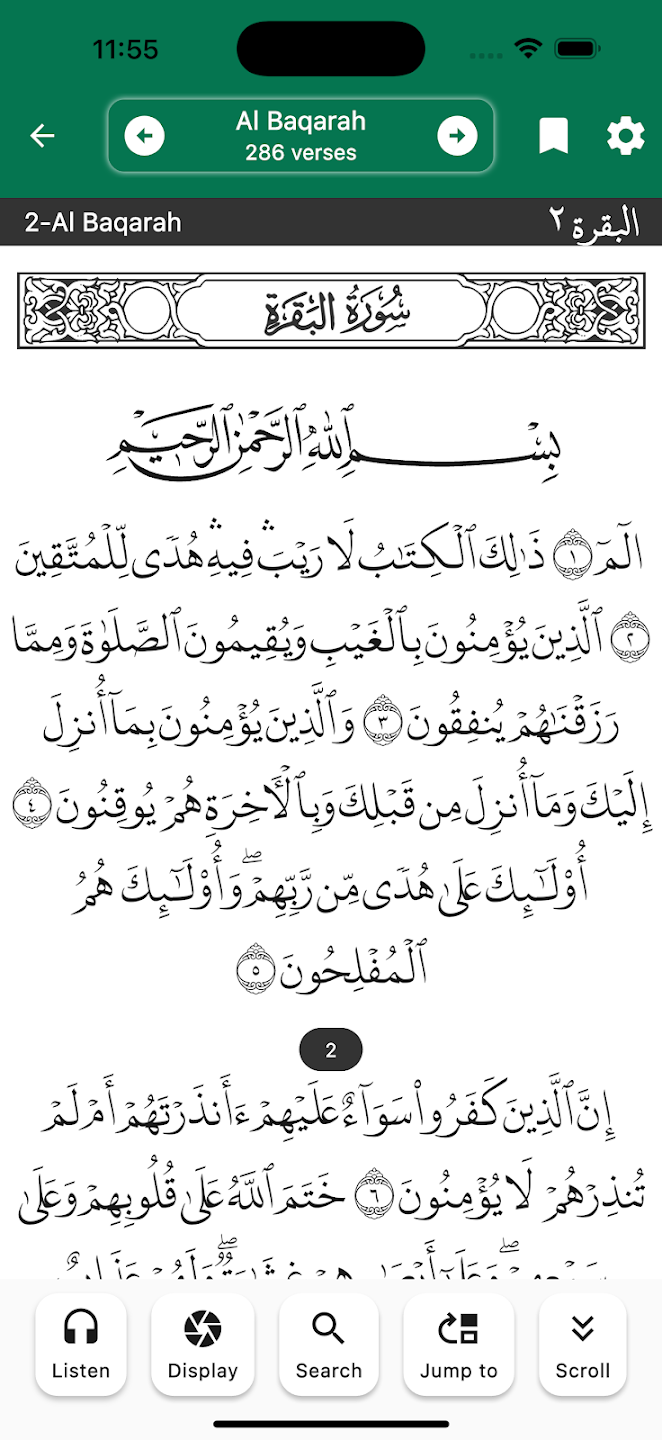
Quick Summary
Tawhid app offers a complete Quran reading experience with 50+ translations, audio recitations by renowned qaris, transliteration, 12+ beautiful themes, multiple Arabic scripts (Uthmani, Indo-Pak Mushaf), advanced search, bookmarks, and offline reading. This comprehensive guide covers all features to help you make the most of your Quran reading experience.
Why Tawhid's Quran Feature Stands Out
Tawhid provides one of the most comprehensive Quran reading experiences available in a mobile app. With 50+ translations in multiple languages, beautiful audio recitations, customizable themes, and offline support, you can read, listen, and study the Quran anywhere, anytime. Whether you're a beginner learning Arabic or an advanced reader, Tawhid has features tailored for you.
Step 1: Accessing the Quran Feature
To start reading the Quran in Tawhid app:
- Open the Tawhid app on your device
- Tap on the "Quran" tab in the bottom navigation bar
- You'll see the Quran reader interface with the current surah displayed
- Use the top navigation to select different surahs
Step 2: Selecting a Surah
The top navigation bar allows you to easily navigate between surahs:
- Surah Selector: Tap on the surah name (e.g., "Al Fatiha") in the center of the top bar
- Dropdown Menu: A dropdown will appear showing all 114 surahs
- Quick Navigation: Use the left/right arrow buttons to move to previous/next surah
- Verse Count: The number of verses is displayed below the surah name (e.g., "7 verses")
- Bookmark Icon: Tap the bookmark icon to save your current position
- Settings Icon: Access Quran settings and customization options
Step 3: Understanding the Quran Interface
The Quran reading screen is beautifully designed with clear sections:
Surah Header
- Surah Title: Displays both English (e.g., "1-Al Fatiha") and Arabic (e.g., "الفاتحة 1")
- Decorative Banner: Beautiful calligraphic surah title banner (e.g., "سورة الفاتحة")
- Visual Design: Elegant patterns and borders for aesthetic appeal
Verse Display
Each verse is displayed with:
- Verse Number: Square outline with verse number on the left
- Arabic Text: Beautiful Arabic script with decorative verse markers
- Translation: English (or selected language) translation below Arabic
- Verse Menu: Three vertical dots on the right for verse options (Play, Bookmark, Share, Copy)
- Decorative Markers: Circular emblems with Arabic numerals at the end of each verse
Step 4: Configuring Quran Settings
Access comprehensive settings by tapping the gear icon in the top right corner:
Quran Settings Menu includes:
- Quran Arabic Text: Choose different Arabic scripts and fonts
- Translation: Select from 50+ translations
- Transliteration: Enable/disable transliteration text
- Quran Layout: Customize how verses are displayed
- Quran Theme: Choose from 12+ beautiful visual themes
- Quran Options: Additional customization settings
Step 5: Choosing Arabic Text Style (Quran Arabic Text)
Tawhid offers multiple Arabic script styles, each with unique characteristics:
Available Scripts
- Uthmani Script (Madani Mushaf 1405): Original King Fahad edition with classic ayah layout and 15-line format (604 pages)
- Uthmani Script (Madani Mushaf 1421): Refined version with minor layout updates in newer prints (604 pages)
- Indo-Pak Mushaf (Naskh): Widely used in South Asia with Naskh script and clear ayah separation for readability (610 pages, 15 lines)
- Other Scripts: Swipe to see more script options available
How to Change Arabic Text
- Go to Settings > Quran Settings > Quran Arabic Text
- Swipe left or right to browse different script options
- Each script shows a preview with Arabic text example
- Tap on your preferred script to select it
- Use the "Font Size" slider to adjust Arabic text size
- Tap "Reset to default" to restore original font size
💡 Pro Tip
Uthmani script is preferred by many for its traditional appearance and clear verse markers. Indo-Pak Mushaf is excellent for those familiar with South Asian printing styles. Try different scripts to find what's most comfortable for your reading.
Step 6: Selecting Translations (50+ Available)
Tawhid offers an extensive collection of translations in multiple languages:
How to Choose Translation
- Go to Settings > Quran Settings > Translation
- Use the search bar to find translations by language, translator, or country
- Browse the list showing translator names and language tags
- Tap the download icon to download a translation (if not already downloaded)
- Select your preferred translation
Available Translation Languages
Popular languages include:
- English: Multiple translations (Sahih International, Yusuf Ali, Pickthall, etc.)
- Arabic: Various Arabic interpretations
- Urdu: Multiple Urdu translations
- Hindi: Hindi translations
- Pashto: Translations by Abdulwali Khan and others
- Albanian: Translations by Feti Mehdiu, Sherif Ahmeti
- Azerbaijani: Translations by Vasim Mammadaliyev, Ziya Bunyadov, Alikhan Musayev
- Bosnian: Translations by Besim Korkut
- And 40+ more languages: French, Spanish, Turkish, Indonesian, Malay, and many others
Translation Display Settings
In Display Properties > Translation:
- Display Translation Text: Toggle to show/hide translations
- Quran Translation: Select which translation to display
- Font Size: Adjust translation text size with slider
- Preview: See how the translation looks before applying
- Reset to default: Restore original font size
Step 7: Using Transliteration
Transliteration helps those learning to read Arabic by showing pronunciation in Latin script:
- Go to Settings > Quran Settings > Display Properties > Transliteration
- Toggle on "Display Transliteration Text"
- Adjust "Font Size" using the slider
- Preview shows example: "Alhamdu lillahi rabbi alAAalameena"
- Transliteration appears below Arabic text in the Quran reader
📚 Learning Tip
Transliteration is especially helpful for beginners learning Arabic pronunciation. Use it alongside Arabic text to improve your reading skills. Once comfortable, you can disable it to focus on Arabic script.
Step 8: Choosing Quran Themes (12+ Beautiful Themes)
Tawhid offers multiple visual themes to customize your reading experience:
Available Themes
- Default Green Theme: Clean white background with green header (recommended)
- Parchment Theme: Beige/parchment background with brown header for traditional feel
- Dark Theme: Dark background for low-light reading
- And 9+ more themes: Various color schemes and styles
How to Change Theme
- Go to Settings > Quran Settings > Display Properties > Quran Theme
- Browse available themes with preview cards
- Each theme shows a preview with Arabic text and translation
- Tap on your preferred theme to select it
- Some themes may be locked (require unlock) - indicated by padlock icon
- Selected theme shows a green checkmark
Step 9: Audio Recitation (Listen to Famous Qaris)
Tawhid provides high-quality audio recitations by renowned qaris from around the world:
How to Select a Reciter
- While reading a surah, tap the "Listen" icon in the bottom navigation
- Or tap the three dots next to a verse and select "Play"
- You'll see the reciter selection screen
- Toggle "Online" to access online reciters (requires internet)
- Browse available reciters with their profile pictures
- Tap on a reciter to select them
- Selected reciter shows a checked checkbox
Available Reciters
Popular reciters include:
- Abdul Rahman Al-Sudais: Imam of the Grand Mosque in Makkah (highly recommended)
- Maher al-Mu'aiqly: Famous Makkah reciter with beautiful voice
- Mishary Rashid Alafasy: Popular Kuwaiti reciter
- Ayman Swed: May require unlock
- Abdul Basit: Classic Egyptian reciter (may require unlock)
- Abdullah Awad Al Juhani: Madinah reciter
- Abdullah Al Matrood: Additional reciter option
- And many more: Search for additional reciters
Audio Playback Controls
When playing audio, you'll see:
- Progress Slider: Shows current playback position (e.g., 00:00 / 00:03)
- Play/Pause Button: Control audio playback
- Previous/Next Verse: Navigate between verses
- Playback Speed: Adjust speed (1x, 1.25x, 1.5x, etc.)
- Playlist Icon: Access playlist or queue
- Stop Button: Stop playback
🎧 Audio Tip
For the best experience, download recitations for offline listening. Use slower playback speeds (0.75x, 0.5x) when learning pronunciation, and faster speeds (1.25x, 1.5x) for review. Abdul Rahman Al-Sudais and Maher al-Mu'aiqly are excellent choices for daily listening.
Step 10: Search Functionality
Tawhid's powerful search feature helps you find specific verses, words, or topics:
How to Search
- Tap the "Search" icon in the bottom navigation
- Enter your search term in the search bar
- Use search filters:
- Quran Text: Search in Arabic text
- Transliteration: Search in transliteration
- Translation: Search in translation text
- Tap "See examples" for search tips
- Example searches: "الْحَمْدُ لِلَّهِ", "surah:50", "verse:22-24"
- Results show matching verses with context
Search Tips
- Arabic Search: Type Arabic text directly (e.g., "الْحَمْدُ لِلَّهِ")
- Surah Reference: Use "surah:50" to search within a specific surah
- Verse Range: Use "verse:22-24" to search specific verse ranges
- English Search: Search in translation text for English words
- Combined: Combine multiple search terms for precise results
Step 11: Bookmarks and Verse Actions
Save your favorite verses and perform actions on individual verses:
Verse Menu Options
Tap the three dots next to any verse to access:
- Play: Listen to audio recitation of that verse
- Bookmark: Save the verse to your bookmarks
- Share: Share the verse via social media, messaging, or email
- Copy: Copy Arabic text, translation, or both to clipboard
Managing Bookmarks
- Access bookmarks from the main menu or settings
- View all bookmarked verses in one place
- Tap a bookmark to jump directly to that verse
- Remove bookmarks by tapping the bookmark icon again
- Organize bookmarks by surah or date
Step 12: Additional Features
Jump to Verse/Surah
- Use the "Jump to" feature in bottom navigation
- Quickly navigate to any surah or verse
- Enter surah number and verse number
- Or browse surah list and select
Auto-Scroll
- Enable "Scroll" mode in bottom navigation
- Automatically scrolls through verses
- Adjustable scroll speed
- Perfect for hands-free reading
Display Options
- Tap "Display" in bottom navigation
- Customize layout and appearance
- Adjust spacing and margins
- Choose verse numbering style
Best Practices for Quran Reading
- Choose Comfortable Theme: Select a theme that's easy on your eyes for extended reading
- Use Appropriate Font Size: Adjust font sizes for both Arabic and translation for comfortable reading
- Download for Offline: Download translations and audio for offline access
- Bookmark Important Verses: Save verses you want to revisit or memorize
- Listen While Reading: Combine audio recitation with reading for better understanding
- Use Search Regularly: Search for topics or keywords to find relevant verses
- Try Different Translations: Compare multiple translations for deeper understanding
- Practice with Transliteration: Use transliteration to improve Arabic pronunciation
- Set a Completion Goal: Work out how many pages of Quran to read per day and let the Khatam Planner track your progress to a chosen date
Common Questions
Can I Read Quran Offline?
Yes! Tawhid supports full offline reading:
- Arabic text works completely offline
- Download translations for offline access
- Download audio recitations for offline listening
- Bookmarks and notes work offline
- Search works offline for downloaded content
How Many Translations Are Available?
Tawhid offers 50+ translations in multiple languages including English, Arabic, Urdu, Hindi, Pashto, Albanian, Azerbaijani, Bosnian, French, Spanish, Turkish, Indonesian, Malay, and many more. New translations are added regularly.
Which Reciter Should I Choose?
Popular choices include:
- Abdul Rahman Al-Sudais: For beautiful, clear recitation
- Maher al-Mu'aiqly: For melodious recitation
- Mishary Rashid Alafasy: For modern, clear style
- Try different reciters to find your preference
Conclusion
Tawhid's Quran feature is one of the most comprehensive Quran reading experiences available. With 50+ translations, multiple Arabic scripts, beautiful themes, audio recitations by famous qaris, and powerful search functionality, you have everything you need to read, study, and understand the Quran.
Take time to explore all the customization options and find settings that work best for your reading style. Whether you're a beginner or advanced reader, Tawhid's features will enhance your Quran reading experience.
Ready to Start Reading?
Download Tawhid app now and experience the most comprehensive Quran reading app with 50+ translations, audio recitations, and beautiful themes.
Related Articles
How to Set Up Accurate Prayer Times in Tawhid App
Complete guide to configuring prayer times, Azan alerts, and Adhan settings.
Read more →
Finding Qibla Direction: A Complete Guide
Learn how to use the Qibla compass feature in Tawhid app.
Read more →
Hadith Collection: Sahih Bukhari, Muslim & More
Read Hadith with Arabic, translations, search by word or number.
Read more →
Essential Duas: Morning, Evening & More
Browse Islamic Duas by category with Arabic, translation, and sources.
Read more →
Ramadan 2026: Suhoor, Iftar & Ashra Duas
Suhoor & Iftar timings, 30 daily duas, Ashra duas. Complete Ramadan guide.
Read more →