Quick Summary
Tawhid's Qibla finder uses GPS and your device's compass to show the accurate direction to Makkah (Kaaba). Features include a beautiful compass interface with Islamic geometric patterns, Qibla map view showing the great circle route, multiple themes, offline support, and precise angle calculations. This guide covers everything you need to find Qibla direction accurately from anywhere in the world.
Why Accurate Qibla Direction Matters
Finding the correct Qibla direction (the direction of the Kaaba in Makkah) is essential for Muslims when performing Salah (prayer). The Qibla direction varies depending on your location on Earth, and using an accurate Qibla finder ensures your prayers are performed facing the correct direction. Tawhid app uses advanced GPS technology and compass sensors to calculate the precise Qibla angle for your location.
Step 1: Accessing the Qibla Feature
To find Qibla direction in Tawhid app:
- Open the Tawhid app on your device
- From the home screen, tap on the "Qibla" icon in your features section
- Or navigate to the main menu and select "Qibla"
- The Qibla compass interface will open
Step 2: Understanding the Qibla Compass Interface
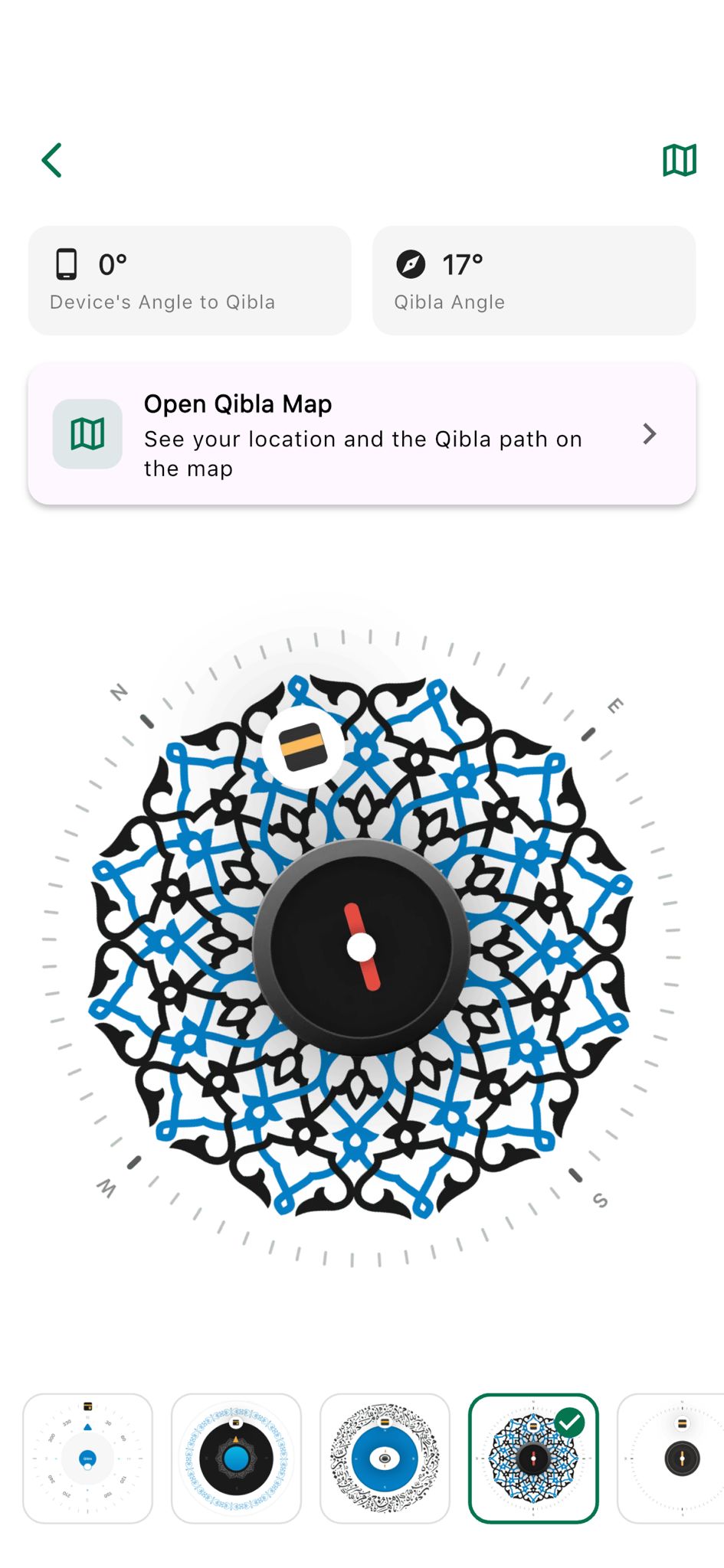
The Qibla compass screen displays several important elements:
Information Cards
- Device's Angle to Qibla: Shows the angle (e.g., 0°) between your device's orientation and the Qibla direction
- Qibla Angle: Displays the calculated Qibla angle (e.g., 17°) from your location to Makkah
- Open Qibla Map: Button to view Qibla direction on an interactive world map
Main Compass Display
The central compass features:
- Islamic Geometric Patterns: Beautiful black and blue arabesque designs as background
- Cardinal Directions: N (North), E (East), S (South), W (West) marked on outer ring
- Degree Markings: Grey tick marks around the compass for precise angle reading
- Kaaba Icon: Small rectangular icon with black background and yellow stripes indicating Qibla direction
- Compass Needle: Red needle pointing to magnetic north (white dot in center)
- Compass Dial: Black circular dial that rotates to show direction
Step 3: Granting Location Permissions
For accurate Qibla calculation, Tawhid needs your location:
- When first opening Qibla feature, you'll be prompted to allow location access
- Tap "Allow" or "Allow While Using App"
- If denied, go to your device Settings > Apps > Tawhid > Permissions > Location
- Enable location permissions for accurate GPS-based Qibla calculation
- The app uses your GPS coordinates to calculate the precise Qibla angle
📍 Location Privacy
Tawhid only uses your location to calculate Qibla direction. Your location data is not stored or shared. You can also manually set your location if you prefer not to use GPS.
Step 4: Calibrating the Compass
For accurate direction, your device's compass needs calibration:
How to Calibrate
- Hold your device flat in your hand
- Move your device in a figure-8 motion slowly
- Continue for 10-15 seconds until the compass stabilizes
- Alternatively, rotate your device 360 degrees slowly
- The compass needle should now point accurately to magnetic north
- Keep your device away from magnetic interference (metal objects, electronics)
Understanding Compass Readings
- Magnetic North: The red compass needle points to magnetic north
- True North: The app calculates the difference and adjusts for Qibla
- Qibla Direction: The Kaaba icon shows the direction to Makkah
- Device Angle: Shows how your device is oriented relative to Qibla
- Qibla Angle: The calculated angle from your location to Makkah
Step 5: Reading the Qibla Direction
Once calibrated, the compass clearly shows Qibla direction:
- Look for the Kaaba icon (black rectangle with yellow stripes) on the compass
- The Kaaba icon indicates the direction to Makkah
- Point your device in the direction where the Kaaba icon is positioned
- The "Device's Angle to Qibla" should read close to 0° when facing Qibla
- The "Qibla Angle" shows the angle from your location (e.g., 17° from north)
- Use the cardinal directions (N, E, S, W) as reference points
Step 6: Using the Qibla Map View
Tawhid offers a visual map view showing your location and Qibla path:
Accessing Qibla Map
- From the Qibla compass screen, tap "Open Qibla Map"
- A world map will open showing your current location
- You'll see a green arc (great circle route) connecting your location to Makkah
- The Kaaba icon (3D black cube) marks Makkah on the map
- Your location is indicated on the map
Understanding the Qibla Map
- Great Circle Route: The green arc shows the shortest path to Makkah (not a straight line on flat maps)
- Your Location: Your GPS location is marked on the map
- Makkah Marker: The Kaaba icon shows the destination in Saudi Arabia
- Map Controls:
- Refresh Icon: Recalculate Qibla direction
- Target/Compass Icon: Center map on your location
- Zoom: Pinch to zoom in/out on the map
- Interactive: You can pan and explore the map to see the Qibla path
🌍 Great Circle Route Explained
The Qibla direction follows a great circle route (the shortest path on a sphere). This means the direction may appear curved on flat maps but is actually the most direct route to Makkah. The green arc on the map visualizes this path, helping you understand the Qibla direction from your location.
Step 7: Choosing Qibla Compass Themes
Tawhid offers multiple beautiful themes for the Qibla compass:
Available Themes
- Islamic Geometric Theme: Black and blue arabesque patterns (default, recommended)
- Blue Dial Theme: Clean blue compass with degree markings
- Dark Theme: Black background with blue compass dial
- Arabic Calligraphy Theme: Blue Arabic calligraphy design
- Minimalist Theme: Simple white background with black dial
- And more: Additional theme options available
How to Change Theme
- Scroll to the bottom of the Qibla compass screen
- You'll see a row of theme preview icons
- Tap on any theme icon to preview it
- The selected theme shows a green border and checkmark
- Your selection is saved automatically
Step 8: Understanding Qibla Angles
The app displays two important angle measurements:
Device's Angle to Qibla
- Shows the angle between your device's current orientation and Qibla direction
- When this reads 0°, your device is pointing directly at Qibla
- Use this to align yourself: rotate until it shows 0°
- Updates in real-time as you move your device
Qibla Angle
- Shows the calculated angle from your location to Makkah
- Measured from true north (0° = North, 90° = East, 180° = South, 270° = West)
- Example: 17° means Qibla is 17 degrees clockwise from north
- This angle is fixed for your location and doesn't change
- Useful for understanding Qibla direction relative to cardinal points
Step 9: Using Qibla Offline
Tawhid's Qibla finder works offline after initial setup:
- GPS Required: First-time location detection needs GPS/internet
- Offline Compass: Once location is set, compass works offline
- Manual Location: Set location manually for offline use
- Map View: Requires internet for map display, but compass works offline
- Perfect for Travel: Use Qibla finder anywhere, even without internet
Step 10: Tips for Accurate Qibla Finding
- Calibrate Regularly: Calibrate compass when moving to new locations or if readings seem off
- Avoid Magnetic Interference: Keep device away from metal objects, magnets, and electronics
- Hold Device Flat: Keep device horizontal for accurate compass reading
- Use Map View: Check map view to verify Qibla direction visually
- Check Device Angle: Rotate until "Device's Angle to Qibla" shows 0°
- Multiple Checks: Verify direction from different spots if unsure
- Indoor Use: Compass works indoors, but GPS may be less accurate
- Travel Mode: Recalibrate when traveling to new cities or countries
Common Issues and Solutions
Compass Not Working or Inaccurate
- Calibrate: Move device in figure-8 motion to recalibrate
- Check Interference: Move away from metal objects, electronics, or magnetic sources
- Restart App: Close and reopen the app
- Check Permissions: Ensure location permissions are granted
- Update App: Make sure you have the latest version
Location Not Detected
- Enable GPS: Turn on location services in device settings
- Grant Permissions: Allow location access for Tawhid app
- Manual Location: Set location manually if GPS unavailable
- Check Internet: First-time location may need internet connection
- Outdoor Use: GPS works better outdoors with clear sky view
Qibla Direction Seems Wrong
- Verify Location: Ensure your location is set correctly
- Check Map View: Compare with Qibla map to verify direction
- Recalibrate: Recalibrate compass if readings are inconsistent
- Compare Sources: Verify with local mosque or another Qibla app
- Update Location: If you've moved, update your location in the app
Understanding Qibla Calculation
Tawhid uses advanced algorithms to calculate Qibla direction:
- GPS Coordinates: Uses your precise latitude and longitude
- Great Circle Formula: Calculates shortest path to Makkah (Kaaba coordinates: 21.4225°N, 39.8262°E)
- Magnetic Declination: Adjusts for difference between magnetic and true north
- Real-time Updates: Updates as your location changes
- High Accuracy: Provides precise Qibla angle for your exact location
Best Practices
- Calibrate Before Prayer: Always calibrate compass before finding Qibla for prayer
- Use Map for Verification: Check map view to confirm direction, especially in new locations
- Mark Qibla Direction: Once found, mark the direction in your room or prayer space
- Regular Updates: Recalibrate when traveling or if device compass seems off
- Combine Methods: Use both compass and map view for best accuracy
- Trust the Calculation: The app uses precise algorithms - trust the Qibla angle shown
- Indoor Markers: Once you know Qibla direction, mark it in your home or mosque
Frequently Asked Questions
Does Qibla Direction Change?
Yes, Qibla direction changes based on your location. The direction to Makkah is different from New York than from London or Tokyo. Tawhid automatically calculates the correct direction for your current location.
Can I Use Qibla Finder Offline?
Yes! After setting your location (requires GPS/internet once), the Qibla compass works completely offline. The map view requires internet, but the compass direction works offline.
How Accurate is the Qibla Finder?
Tawhid's Qibla finder is highly accurate, using GPS coordinates and great circle calculations. Accuracy depends on:
- GPS signal strength (better outdoors)
- Compass calibration
- Device quality
For most users, accuracy is within 1-2 degrees, which is sufficient for prayer.
What if I'm Directly North or South of Makkah?
If you're directly north of Makkah, Qibla is due south. If directly south, Qibla is due north. The app calculates the exact direction regardless of your location on Earth.
Can I Set Qibla for a Different Location?
Yes, you can manually set your location in the app settings. This is useful if you want to find Qibla for a different city or if GPS is unavailable.
Conclusion
Tawhid's Qibla finder is a powerful, accurate tool for finding the direction to Makkah from anywhere in the world. With GPS-based calculation, beautiful compass interface, interactive map view, multiple themes, and offline support, you have everything you need to find Qibla direction accurately.
Remember to calibrate your compass regularly, especially when traveling, and use both the compass and map views for the most accurate results. The app's precise calculations ensure your prayers are performed facing the correct direction.
Ready to Find Your Qibla Direction?
Download Tawhid app now and use the accurate Qibla finder with GPS-based compass, interactive map, and beautiful themes. Find Makkah direction from anywhere in the world.
Related Articles
How to Set Up Accurate Prayer Times in Tawhid App
Complete guide to configuring prayer times, Azan alerts, and Adhan settings.
Read more →
Complete Guide to Reading Quran with 50+ Translations
Master Tawhid's Quran feature with translations, audio, themes, and more.
Read more →