Quick Summary
Tawhid’s Duas section gives you a full library of Islamic supplications organized by category. Each Dua shows the Arabic text, English translation, and Hadith references (e.g. Al-Bukhari, Muslim). You can play audio, bookmark, copy, and share Duas. The header offers Share, Search, Bookmark, and Settings. In Settings you can change font family (e.g. Uthmani Madani Mushaf), font size, and toggle Display Translation and Display Transliteration. Search works in English and Arabic so you can find Duas by topic or phrase—ideal for daily use and maximum reach.
Why Duas Matter and Why Use Tawhid for Duas
Duas (supplications) are a core part of Muslim life. The Prophet Muhammad (peace be upon him) taught us to remember Allah in the morning and evening, before and after eating, when traveling, and in times of joy and difficulty. Tawhid brings these Duas together in one place with clear Arabic text, reliable English translations, and authentic sources so you can recite with confidence and share with family and friends. Categories, search, and display options make it easy to find and use Duas every day.
Step 1: Accessing the Duas Section
To open Duas in Tawhid:
- Open the Tawhid app on your device
- Tap Duas in the main menu or navigation
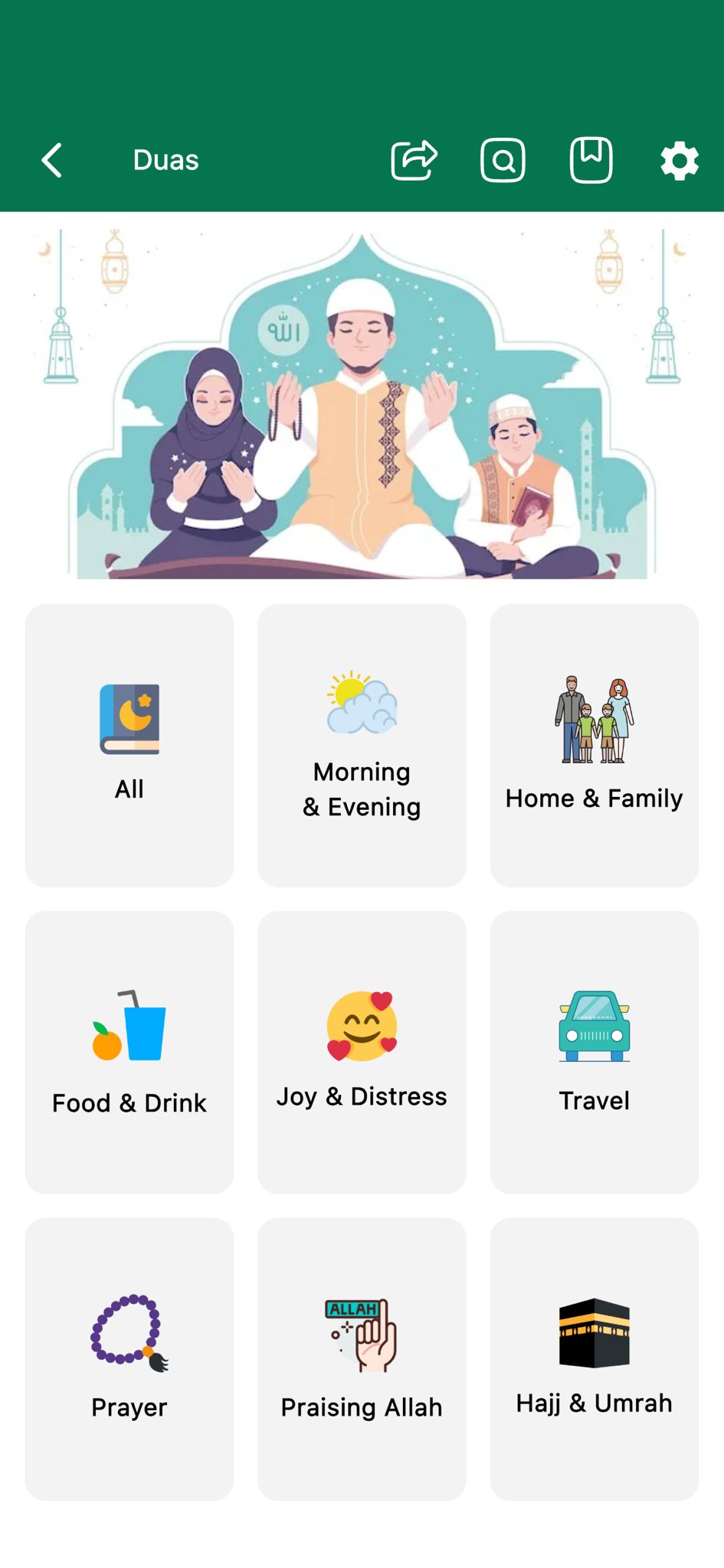
- You will see the Duas screen with a green header titled Duas
- In the header: Back arrow (left), Share, Search, Bookmark, and Settings (gear) icons on the right
- Below the header, a themed banner (e.g. mosque, supplication scene) and then the category grid
Step 2: Dua Categories (All, Morning & Evening, Home & Family, and More)
Duas are organized into categories so you can quickly find supplications for the right moment. Each category has a clear label and icon.
Available Categories
- All: Browse the full collection of Duas in one place (icon: open book with crescent and stars)
- Morning & Evening: Duas for the start and end of the day—e.g. when waking up, when going to sleep (icon: sun and cloud)
- Home & Family: Duas for family life, entering the home, and family protection (icon: family)
- Food & Drink: Duas before and after eating and drinking (icon: fruit and drink)
- Joy & Distress: Duas for times of happiness and difficulty (icon: smiley with hearts)
- Travel: Duas for setting off on a journey and when returning (icon: car)
- Prayer: Duas related to Salah and worship (icon: prayer beads / tasbih)
- Praising Allah: Duas and phrases for glorifying Allah (icon: hand and “Allah”)
- Hajj & Umrah: Supplications for the pilgrimage (icon: Kaaba)
Tap any category to see its list of Duas. Use the back arrow to return to the main Duas screen.
Step 3: Reading a Dua (Arabic, Translation, Sources, and Actions)
When you open a category (e.g. Morning & Evening) you may see sub-sections such as 1. When waking up. Each Dua is shown in a card-style layout.
Dua Entry Layout
- Entry number: A number in a circle (e.g. 1, 2) on the top left
- Actions (top right): Bookmark to save the Dua; Copy to copy the text to the clipboard
- Arabic text: The supplication in clear, large Arabic script (e.g. الْحَمْدُ لِلَّهِ الَّذِي أَحْيَانَا بَعْدَ مَا أَمَاتَنَا وَإِلَيْهِ النُّشُورُ)
- English translation: Directly below the Arabic (e.g. “Praise is to Allah Who gives us life after He has caused us to die and to Him is the return.”)
- Source/Reference: Hadith references such as [Al-Bukhari, cf. Al-Asqalani, Fathul-Bari 11/113, Muslim 4/2083.] so you can verify and cite the Dua
- Engagement (bottom): Play button for audio recitation; Likes count (e.g. 415); Share count (e.g. 410)—helpful for discovering popular Duas and sharing with others
Example: Dua When Waking Up
Arabic:
الْحَمْدُ لِلَّهِ الَّذِي أَحْيَانَا بَعْدَ مَا أَمَاتَنَا وَإِلَيْهِ النُّشُورُ
English: “Praise is to Allah Who gives us life after He has caused us to die and to Him is the return.”
Source: Al-Bukhari, cf. Al-Asqalani, Fathul-Bari 11/113; Muslim 4/2083.
💡 Pro Tip
Use Bookmark to save your most-used Duas (e.g. morning, evening, travel) for quick access. Use Copy to paste a Dua into notes or messages. Share helps spread beneficial supplications to family and friends and increases reach.
Step 4: Searching Duas (English and Arabic)
Tawhid’s Dua search helps you find supplications by topic or by Arabic phrase—great for “dua for sleep”, “dua when waking up”, or “الْحَمْدُ لِلَّهِ” style queries.
How to Search
- Tap the Search icon (magnifying glass) in the Duas header
- A search bar appears (often on the green header) with a Cancel button
- Type your search in English (e.g. “Morning”, “Sleep”, “travel”) or in Arabic (e.g. الْحَمْدُ لِلَّهِ)
- Results show matching Duas; if nothing matches, you may see “No data found”—try different or shorter keywords
Search Tips
- Use category-style words: Morning, Evening, Sleep, Food, Travel, Prayer, Hajj, etc.
- Use common Arabic phrases that appear in Duas (e.g. Alhamdulillah, Bismillah) for precise matches
- Combine words if the app supports it (e.g. “Morning, Sleep”) for more specific results
Step 5: Dua Settings (Font Family, Font Size, Translation, Transliteration)
Dua Settings let you control how the text looks and whether you see translation and transliteration—important for readability and for learners.
Opening Settings
Tap the Settings (gear) icon in the Duas header to open the Settings screen.
Font Family
- Swipe to see more options: Font choices can be swiped horizontally
- Selected font: Shown in a highlighted card, e.g. Uthmani (Madani Mushaf 1405)
- Preview: Sample Arabic text in the chosen font (e.g. اللَّهُمَّ صَلَّ عَلَى مُحَمَّدٍ وَآلِ مُحَمَّدٍ — O Allah, bless Muhammad and the family of Muhammad)
- Use the left/right arrows on the card to switch between font families
Font Size
- Slider: A horizontal slider controls the font size (green track and thumb)
- Reset to default: A link or button to restore the original font size
- Preview: Sample text such as الْحَمْدُ لِلَّهِ (Alhamdulillah) shows the current size
Display Translation
A toggle switch: when ON (green), the English (or selected language) translation is shown below each Dua. When OFF, only the Arabic is shown. Turn translation on for understanding and off if you prefer Arabic-only display.
Display Transliteration Text
- Toggle: When ON, transliteration (Arabic sounds in Latin script) appears, e.g. Alhamdu lillahi rabbi alAAalameena
- Helps those who cannot yet read Arabic to pronounce Duas correctly
- Turn it off for a cleaner look once you are comfortable with the Arabic
Step 6: Share, Bookmark, and Search from the Header
From the main Duas screen or inside a category:
- Share: Share the current Dua or section so others can benefit—increases reach and engagement
- Search: Open search to find Duas by keyword or Arabic phrase
- Bookmark: Save Duas to a favorites list for quick access later
- Settings: Adjust font family, font size, display translation, and display transliteration
Best Practices for Using Duas
- Use Morning & Evening daily for the Prophet’s recommended adhkar (remembrances)
- Bookmark Duas you recite often (waking up, sleeping, travel, food) for quick access
- Enable transliteration if you are learning pronunciation; turn it off when you are comfortable with Arabic
- Share Duas with family and friends to spread beneficial content
- Check the source (e.g. Bukhari, Muslim) to build confidence in what you recite
- Use search with both English and Arabic terms to find the right Dua for the moment
Common Questions
What Dua categories are available?
Tawhid offers: All, Morning & Evening, Home & Family, Food & Drink, Joy & Distress, Travel, Prayer, Praising Allah, and Hajj & Umrah. Each category contains Duas with Arabic text, English translation, and Hadith references where applicable.
Can I search Duas in Arabic?
Yes. The search supports both English keywords (e.g. Morning, Sleep, Travel) and Arabic text (e.g. الْحَمْدُ لِلَّهِ). Use whichever you prefer to find the Dua you need.
Are the Duas from authentic sources?
Duas in Tawhid include references to Hadith collections such as Al-Bukhari, Muslim, and scholarly works (e.g. Fathul-Bari). You can use these references to verify and study the sources.
Conclusion
Tawhid’s Duas feature puts a full library of Islamic supplications at your fingertips—organized by category, with Arabic text, English translation, and Hadith sources. Use search (English and Arabic), audio playback, bookmark, copy, and share to make Duas part of your daily routine and to help others do the same. Customize the display with font family, font size, translation, and transliteration in Settings for maximum accessibility and reach.
Ready to Add Duas to Your Day?
Download Tawhid app and access Morning & Evening Duas, Travel Duas, Food & Drink Duas, and more—with audio, bookmark, and share.
Related Articles
How to Set Up Accurate Prayer Times in Tawhid App
Complete guide to configuring prayer times, Azan alerts, and Adhan settings.
Read more →
Complete Guide to Reading Quran with 50+ Translations
Learn how to use Tawhid's Quran feature with audio recitations and translations.
Read more →
Hadith Collection: Sahih Bukhari, Muslim & More
Read Hadith with Arabic, translations, search by word or number.
Read more →
Finding Qibla Direction: A Complete Guide
Understand how to use the Qibla compass feature in Tawhid app.
Read more →
Ramadan 2026: Suhoor, Iftar & Ashra Duas
Suhoor & Iftar timings, 30 daily duas, Ashra duas, Duas for Suhoor and Iftar.
Read more →
Digital Tasbih: Dhikr Counter Guide
Tasbih list, 33/100 counts, Sound, Haptic, Lock. Complete dhikr guide.
Read more →
Zakat Calculator: Complete Guide
Money, Gold, Silver, Investments & more. Total Assets, Zakat Due, currency.
Read more →