Quick Summary
Tawhid’s Tasbih section gives you a Tasbih list of dhikr phrases in Arabic—each with a preset count (e.g. 33 or 100)—plus Share, Bookmark, and Add (plus icon). Tap a Tasbih to open the digital counter: the current phrase is shown, progress (e.g. 1/33), a large count button, Reset and Undo/Redo, and at the bottom Sound, Haptic, and Theme. You can Lock the counter to prevent accidental counts. This guide walks you through every feature.
Why Use a Digital Tasbih (Dhikr Counter)
Dhikr—remembrance of Allah—is a core part of Muslim worship. Many Muslims recite phrases like SubhanAllah, Alhamdulillah, and Allahu Akbar 33 times each after Salah, or other phrases in sets of 33 or 100. A digital Tasbih in your phone is always available, never gets lost, and can show the phrase, track your count, and give sound or haptic feedback. Tawhid’s Tasbih combines a clear list of phrases with a simple, customizable counter so you can build a steady dhikr habit.
Step 1: Opening the Tasbih List
To access Tasbih in Tawhid:
- Open the Tawhid app and go to the Tasbih section
- You will see the Tasbih screen with a header: Back arrow, title Tasbih, and on the right Share, Bookmark, and Plus (add) icons
- Below the header is a scrollable list of Tasbih entries, each in its own card
Step 2: Tasbih List Entries (Arabic, Counts, Like, Menu)
Each Tasbih card shows the phrase and how many times to recite it. Tawhid includes well-known dhikr with standard counts.
What Each Card Shows
- Arabic text: The dhikr phrase in clear Arabic script (e.g. سُبْحَانَ اللهِ، وَالْحَمْدُ لِلَّهِ، وَاللَّهُ أَكْبَرُ)
- Count: A number and the word “counts” (e.g. 33 counts, 100 counts)—the recommended number of repetitions
- Heart icon: Tap to like or favorite that Tasbih for quick access
- Three-dot menu: Opens more options for that entry (e.g. share, edit, remove)
Example Tasbih Phrases in the List
- La ilaha illallah wahdahu la sharika lahu… — 100 counts
- SubhanAllah, walhamdulillah, wa Allahu Akbar — 33 counts (glory, praise, and greatness of Allah—often recited after Salah)
- SubhanAllah wa bihamdihi — 100 counts
- La ilaha illa anta, subhanaka inni kuntu minaz-zalimin — 33 counts (the Prophet Yunus’s supplication)
- SubhanAllah — 33 counts
- Alhamdulillah — 33 counts
Tap any card to open the digital counter for that phrase.
Step 3: Digital Tasbih Counter (Count, Reset, Undo)
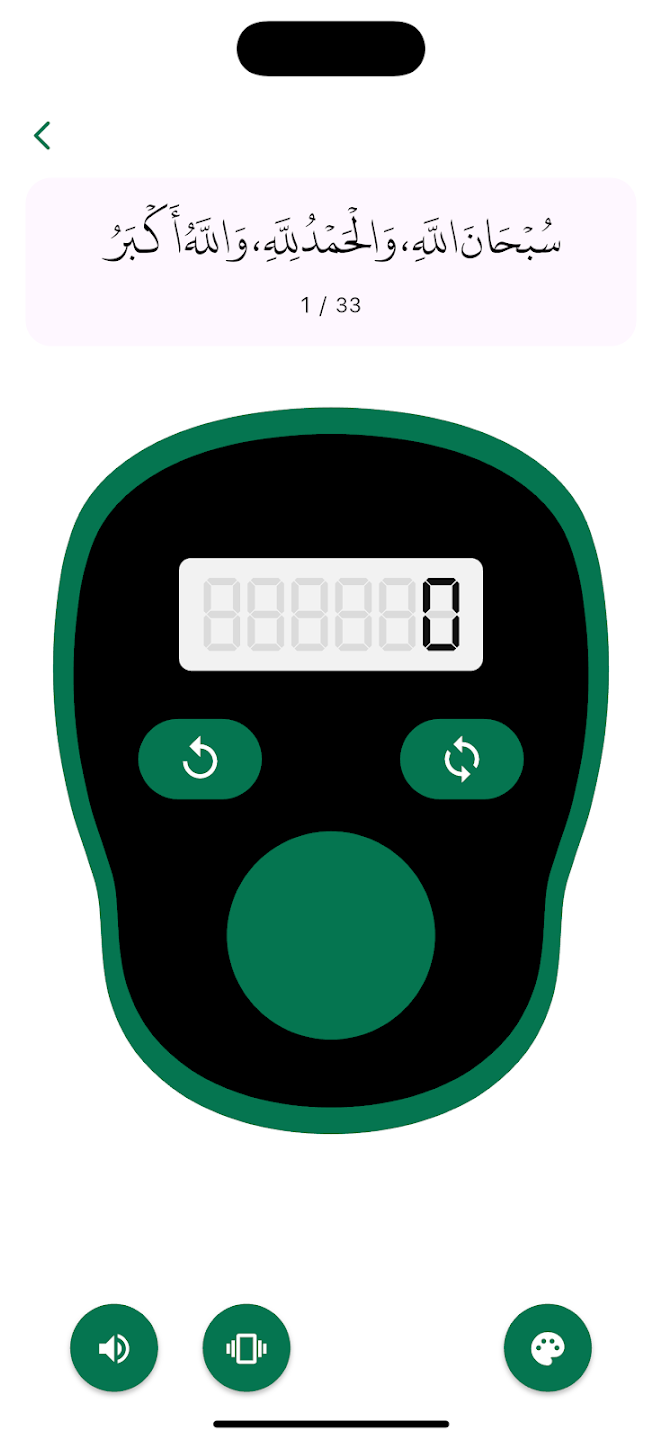
When you open a Tasbih, you see the counter screen with the selected phrase and controls to count your dhikr.
Top Section
- Back arrow: Return to the Tasbih list
- Dhikr text: The current phrase is shown in a rounded box (e.g. سُبْحَانَ اللَّهِ، وَالْحَمْدُ لِلَّهِ، وَاللَّهُ أَكْبَرُ — SubhanAllah, walhamdulillah, wa Allahu Akbar)
- Progress: Text like 1 / 33 shows your current count and the target (e.g. first of 33)
Counter Unit and Buttons
- Digital display: A large display (e.g. 8888880 style) shows the current count; “0” is clear when you haven’t started
- Reset button: Green button with a counter-clockwise arrow—resets the count to zero so you can start a new round
- Undo/Redo button: Green button with clockwise or cycle arrows—undoes the last count (or redoes), so you can correct mistakes
- Main count button: Large circular button (green or dark)—tap it each time you complete one repetition of the phrase; the count increases by one
Bottom Controls (Sound, Haptic, Theme)
- Sound: Speaker icon—toggle sound on or off (e.g. a click or beep when you count)
- Haptic: Vibration icon—toggle haptic feedback so the phone vibrates slightly on each count
- Theme: Palette icon—open theme or color options to change the look of the counter (e.g. green, red, or other styles)
Step 4: Lock Feature (Prevent Accidental Counts)
If you carry your phone in your pocket or bag while the Tasbih screen is open, you might tap the count button by mistake. Tawhid offers a Lock option.
- When Lock is enabled, the main count button is replaced (or covered) by a padlock icon
- Tapping the locked button does not increase the count—you must unlock first
- This is useful when you pause dhikr but leave the screen open, or when you want to show the phrase without risking accidental taps
💡 Pro Tip
After each prayer, open the “SubhanAllah, Alhamdulillah, Allahu Akbar” Tasbih (33 counts each) and use the counter. Turn on Sound or Haptic so you can count without looking at the screen. Use Lock when you put the phone down so the count doesn’t change by accident.
Step 5: Share, Bookmark, and Add
From the Tasbih list header:
- Share: Share the Tasbih list or a specific phrase with others so they can use the same dhikr
- Bookmark: Save the list or your position for quick access later
- Plus (Add): Add a new Tasbih or custom dhikr so you can count your own phrase and target count
Best Practices for Dhikr with Tasbih
- Recite after Salah: Use the 33-count phrase (SubhanAllah, Alhamdulillah, Allahu Akbar) right after each prayer
- Use Sound or Haptic: Helps you keep rhythm and avoid losing count without staring at the screen
- Reset when starting a new round: Tap Reset so the display and progress (e.g. 1/33) match your new round
- Use Undo if you miscount: One tap too many? Undo once and continue
- Lock when not counting: Prevents accidental increments when the phone is in your pocket or on the table
- Favorite your most-used Tasbih: Use the heart icon so your go-to phrases are easy to find
Common Questions
What is the 33-count dhikr after prayer?
Many Muslims recite SubhanAllah (33 times), Alhamdulillah (33 times), and Allahu Akbar (33 times) after each obligatory prayer. In Tawhid, the Tasbih “SubhanAllah, walhamdulillah, wa Allahu Akbar” with 33 counts lets you do one combined set; you can also use separate 33-count entries for each phrase if you prefer.
Can I add my own Tasbih?
Yes. Use the Plus (Add) icon in the Tasbih list header to create a custom Tasbih. Enter the Arabic or transliteration and set the number of counts (e.g. 33 or 100) so you can count any dhikr you like.
Why use Lock on the Tasbih counter?
Lock prevents the main count button from registering taps. Use it when you pause with the counter screen open (e.g. phone in pocket or on the table) so the count doesn’t change accidentally. Unlock when you’re ready to continue.
Conclusion
Tawhid’s Tasbih feature gives you a full dhikr list in Arabic with preset counts (33, 100, etc.), a digital counter with Reset and Undo, Sound and Haptic feedback, themes, and Lock. Use it after prayer for the classic 33-count phrase, favorite your most-used Tasbih, and add custom phrases with the Plus icon. A digital Tasbih is always with you—no beads required—and helps you keep a consistent remembrance of Allah.
Ready to Count Your Dhikr?
Download Tawhid app and use the Tasbih list and digital counter for SubhanAllah, Alhamdulillah, Allahu Akbar, and more.
Related Articles
Essential Duas: Morning, Evening & More
Pair Tasbih with daily Duas for a complete remembrance routine.
Read more →
How to Set Up Accurate Prayer Times
Get Fajr, Dhuhr, Asr, Maghrib, Isha times for prayer and post-prayer dhikr.
Read more →
Ramadan 2026: Suhoor, Iftar & Ashra Duas
Use Tasbih during Ramadan alongside Ramadan Duas and timings.
Read more →
Complete Guide to Reading Quran
Quran, Duas, and Tasbih together for a full worship toolkit.
Read more →