Quick Summary
Tawhid app gives you access to major Hadith collections—Sahih al-Bukhari, Sahih Muslim, Sunan Abi Dawud, and Jamiʿ at-Tirmidhi—with full Arabic text (with diacritics), English and Urdu translations, chapter titles in English and Arabic, and the chain of narration (isnad). You can search by keyword (topic) or by Hadith number, filter by book, toggle Display Arabic and Display Translation, adjust Arabic and translation font sizes, and use share and bookmark. This guide walks you through every feature for maximum reach and study.
Why Hadith Matters and Why Use Tawhid for Hadith
Hadith are the sayings, actions, and approvals of the Prophet Muhammad (peace be upon him). Together with the Quran, they form the core of Islamic guidance. The six canonical books of Hadith—especially Sahih al-Bukhari and Sahih Muslim—are among the most trusted sources. Tawhid brings these collections to your phone with clear Arabic text (including diacritics for correct reading), multiple translations (e.g. English, Urdu), narrator attribution, and powerful search so you can find Hadith by topic or by number. Whether you are learning, teaching, or simply reading daily, Tawhid’s Hadith feature is built for clarity and maximum reach.
Step 1: Accessing the Hadith Collection
To open the Hadith section in Tawhid:
- Open the Tawhid app on your device
- Tap on the Hadith or Hadith Collection option in the main menu or bottom navigation
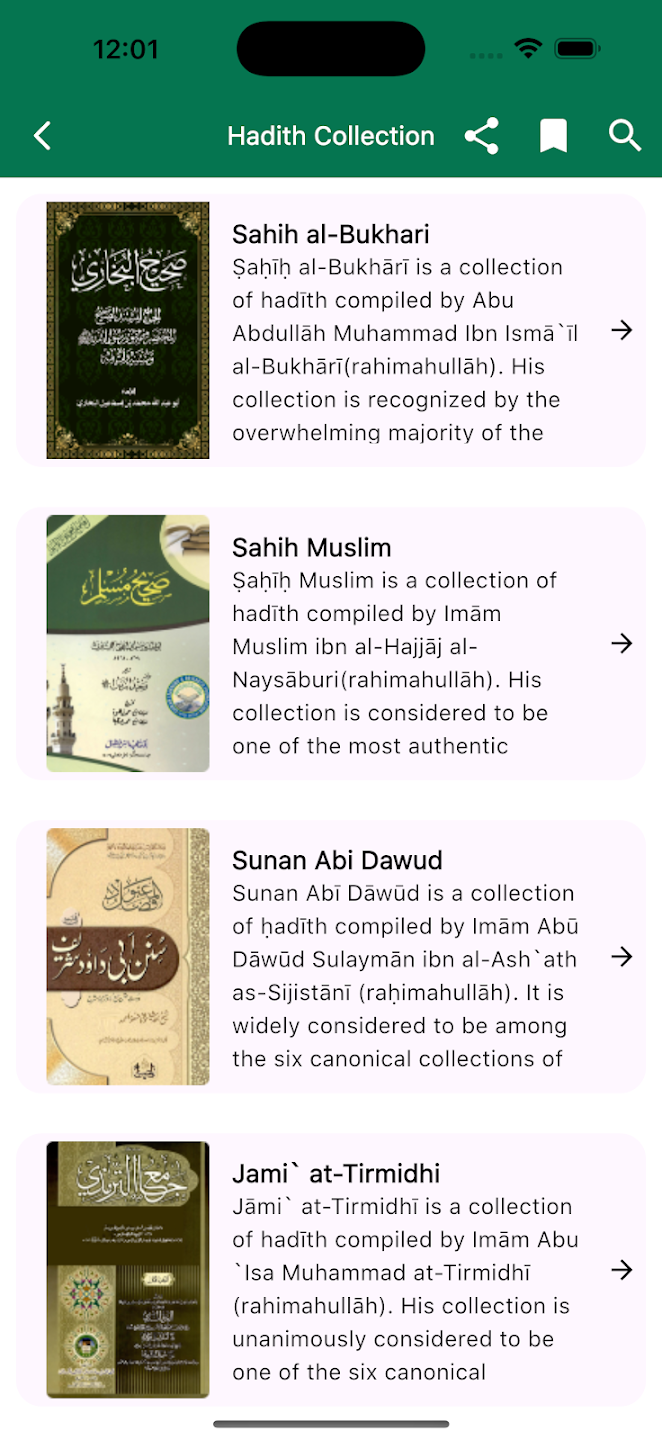
- You will see the Hadith Collection screen with a green header titled Hadith Collection
- On the right side of the header you have: Share, Bookmark, and Search icons for quick access
Step 2: Browsing Hadith Collections (Sahih al-Bukhari, Muslim, and More)
Tawhid lists the main Hadith collections so you can choose by book and compiler. Each entry shows a short description of the collection and its importance.
Available Hadith Collections
- Sahih al-Bukhari: Compiled by Abu Abdullah Muhammad Ibn Ismāʿīl al-Bukhārī (rahimahullāh). His collection is recognized by the majority of scholars as one of the most authentic compilations of Hadith.
- Sahih Muslim: Compiled by Imām Muslim ibn al-Hajjāj al-Naysāburi (rahimahullāh). Considered one of the most authentic Hadith collections, often studied alongside Sahih al-Bukhari.
- Sunan Abi Dawud: Compiled by Imām Abū Dāwūd Sulaymān ibn al-Ashʿath as-Sijistānī (rahimahullāh). Widely considered among the six canonical books and a key source for Islamic jurisprudence.
- Jamiʿ at-Tirmidhi: Compiled by Imām Abū ʿĪsā Muhammad at-Tirmidhi (rahimahullāh). Unanimously considered one of the six major Hadith collections, known for grading and legal commentary.
Tap any collection to open its books and chapters. Use the back arrow in the header to return to the Hadith Collection list.
Step 3: Reading a Hadith (Chapters, Arabic, Narrator, Translation)
When you open a book (e.g. Book of Revelation in Sahih al-Bukhari), each Hadith is presented in a structured, SEO-friendly way.
Chapter Title (English and Arabic)
At the top you see:
- English chapter title: e.g. “(1) Chapter: How the Divine Revelation started being revealed to Allah's Messenger”
- Arabic chapter title: e.g. “(1) باب كَيْفَ كَانَ بَدْءُ الْوَحْيِ إِلَى رَسُولِ اللَّهِ صلى الله عليه وسلم” — same content in Arabic with diacritics for correct reading
Arabic Hadith Text (with Diacritics) and Chain of Narration (Isnad)
The Hadith is shown in classical Arabic with full diacritics (tashkeel), which helps with pronunciation and understanding. The chain of narrators (isnad) appears first, e.g. from al-Humaydi → Sufyan → Yahya ibn Saʿid al-Ansari → … up to the Companion (e.g. ʿUmar ibn al-Khattab, may Allah be pleased with him). The actual Hadith text (matn) follows, often in quotation marks. For example, the famous Hadith of intention:
إِنَّمَا الْأَعْمَالُ بِالنِّيَّاتِ، وَإِنَّمَا لِكُلِّ امْرِئٍ مَا نَوَى، فَمَنْ كَانَتْ هِجْرَتُهُ إِلَى دُنْيَا يُصِيبُهَا أَوْ إِلَى امْرَأَةٍ يَنْكِحُهَا فَهِجْرَتُهُ إِلَى مَا هَاجَرَ إِلَيْهِ
Translation (English and Urdu)
Below the Arabic:
- Narrator line: e.g. “Narrated ʿUmar bin Al-Khattab:” so you know who reported the Hadith.
- English translation: Full translation of the Hadith (e.g. “The reward of deeds depends upon the intentions…”). The symbol ﷺ (peace be upon him) is used after references to the Messenger.
- Urdu translation (when available): The same Hadith or chain can be shown in Urdu for readers who prefer it, helping reach a wider audience.
💡 Pro Tip
Use both Arabic and translation together to improve your Arabic and deepen understanding. In Hadith Settings you can turn Display Arabic and Display Translation on or off and adjust font sizes for each.
Step 4: Searching Hadith (By Word or Hadith Number)
Tawhid’s search is built for two main use cases: finding Hadith by topic (keyword) or by exact Hadith number. This supports both general discovery and precise reference—great for SEO and for users searching “Hadith about X” or “Sahih Bukhari Hadith 1”.
Opening Search
- Tap the Search icon (magnifying glass) in the Hadith Collection header or inside a Hadith book
- You will see a search bar with placeholder “Search in all books”
- Use Cancel to close search when done
Search By: Word or Hadith Number
Search by Word (topic/keyword):
- Leave “Search by” set to Word
- Type words or phrases (e.g. “drinking water”, “patience”, “charity”) to find Hadith on that topic
- Use multiple words for more specific results (e.g. “Drinking water”)
Search by Hadith Number:
- Change “Search by” to Hadith Number
- Type the Hadith number (e.g. 1, 7000) to jump to that Hadith in the selected book
- Ideal for students and scholars who cite by number
Filter by Books
Use the Books dropdown to limit search to one collection:
- Select Sahih al-Bukhari, Sahih Muslim, Sunan Abi Dawud, Jamiʿ at-Tirmidhi, or “all books” depending on the option shown
- Narrowing by book makes results faster and more relevant when you want a specific collection
Search Instructions (On-Screen Tips)
The app may show short instructions such as:
- “Type the words to search for any topic.”
- “Type the hadith number and choose ‘Search by Hadith Number’.”
- “Search using multiple words. For example: Drinking water.”
These reflect how users naturally search—by topic or by number—so your own content (e.g. blog titles and meta descriptions) can target the same intents: “Hadith about drinking water”, “Sahih Bukhari Hadith 1”, etc.
Step 5: Hadith Settings (Display Arabic, Translation, Font Sizes)
Hadith Settings let you control what you see and how readable it is—important for accessibility and for users who prefer only Arabic or only translation.
Opening Hadith Settings
Tap the Settings (gear) icon from the Hadith reading or collection screen to open Hadith Settings.
Display Arabic and Display Translation
- Display Arabic: Toggle ON to show the Arabic Hadith text (with diacritics); turn OFF to hide it (e.g. if you only want translation)
- Display Translation: Toggle ON to show the selected translation (e.g. English or Urdu); turn OFF to show only Arabic
Combining these toggles supports different audiences: Arabic-only, translation-only, or both for study and maximum reach.
Arabic Font Size and Translation Font Size
Two separate controls with minus (–) and plus (+) buttons:
- Arabic font size: Adjust the size of the Arabic text (e.g. default 28). A sample such as “الْحَمْدُ لِلَّهِ” is shown so you can preview before confirming.
- Translation font size: Adjust the size of the translation (e.g. default 25). A sample such as “Alhamdulillah” is shown.
Larger fonts help readability on small screens and for users with visual needs; smaller fonts allow more content on screen. Use the preview to find a comfortable size.
Step 6: Share, Bookmark, and Search from the Header
From the Hadith Collection or Hadith reading screen, the header gives quick access to:
- Share: Share the current Hadith or collection link (e.g. to social media or messaging) so others can read—great for spreading beneficial knowledge.
- Bookmark: Save Hadith for later. Build a personal list of favorites for revision or teaching.
- Search: Open the search screen to find Hadith by word or number without leaving the current context.
Best Practices for Hadith Reading and SEO Reach
- Use both Arabic and translation when possible for better understanding and to support multilingual search and reach.
- Search by topic for “Hadith about [topic]” style queries; use Hadith number when you need a specific reference (e.g. Sahih Bukhari 1).
- Filter by book when you want results from one collection only.
- Bookmark key Hadith (e.g. on intention, patience, charity) for quick access and sharing.
- Adjust font sizes in Hadith Settings for comfortable reading on your device.
- Share Hadith with proper attribution (book, chapter, number, narrator) so others can verify and benefit.
Common Questions
Which Hadith collections are included?
Tawhid includes Sahih al-Bukhari, Sahih Muslim, Sunan Abi Dawud, and Jamiʿ at-Tirmidhi—four of the six canonical books (Kutub al-Sittah). These are among the most cited and trusted Hadith collections in Islam.
Can I search for a Hadith by number?
Yes. In the Hadith search screen, set Search by to Hadith Number, choose the book (e.g. Sahih al-Bukhari), and type the Hadith number. You will be taken to that Hadith for precise reference and citation.
Are Hadith available in multiple languages?
Yes. Tawhid provides the original Arabic (with diacritics) plus translations such as English and Urdu. Display Arabic and Display Translation can be toggled in Hadith Settings, so you can read in the language that suits you and reach a global audience.
Conclusion
Tawhid’s Hadith feature brings major Hadith collections to your phone with clear structure: chapter titles in English and Arabic, full Arabic text with diacritics, chain of narration and narrator names, and English and Urdu translations. Search by word (topic) or by Hadith number, filter by book, and customize display and font sizes. Use share and bookmark to save and spread Hadith. Whether you are studying, teaching, or reading for daily guidance, this setup is designed for clarity, authenticity, and maximum reach.
Ready to Read Hadith on the Go?
Download Tawhid app and access Sahih al-Bukhari, Sahih Muslim, Sunan Abi Dawud, and Jamiʿ at-Tirmidhi with search, translations, and customizable display.
Related Articles
How to Set Up Accurate Prayer Times in Tawhid App
Complete guide to configuring prayer times, Azan alerts, and Adhan settings.
Read more →
Complete Guide to Reading Quran with 50+ Translations
Learn how to use Tawhid's Quran feature with audio recitations and translations.
Read more →
Finding Qibla Direction: A Complete Guide
Understand how to use the Qibla compass feature in Tawhid app.
Read more →
Essential Duas: Morning, Evening & More
Browse Islamic Duas by category with Arabic, translation, and sources.
Read more →
Ramadan 2026: Suhoor, Iftar & Ashra Duas
Suhoor & Iftar timings, daily and Ashra duas. Get ready for Ramadan.
Read more →
Digital Tasbih: Dhikr Counter Guide
Tasbih list, counter, 33/100 counts, Sound, Haptic, Lock.
Read more →