Quick Summary
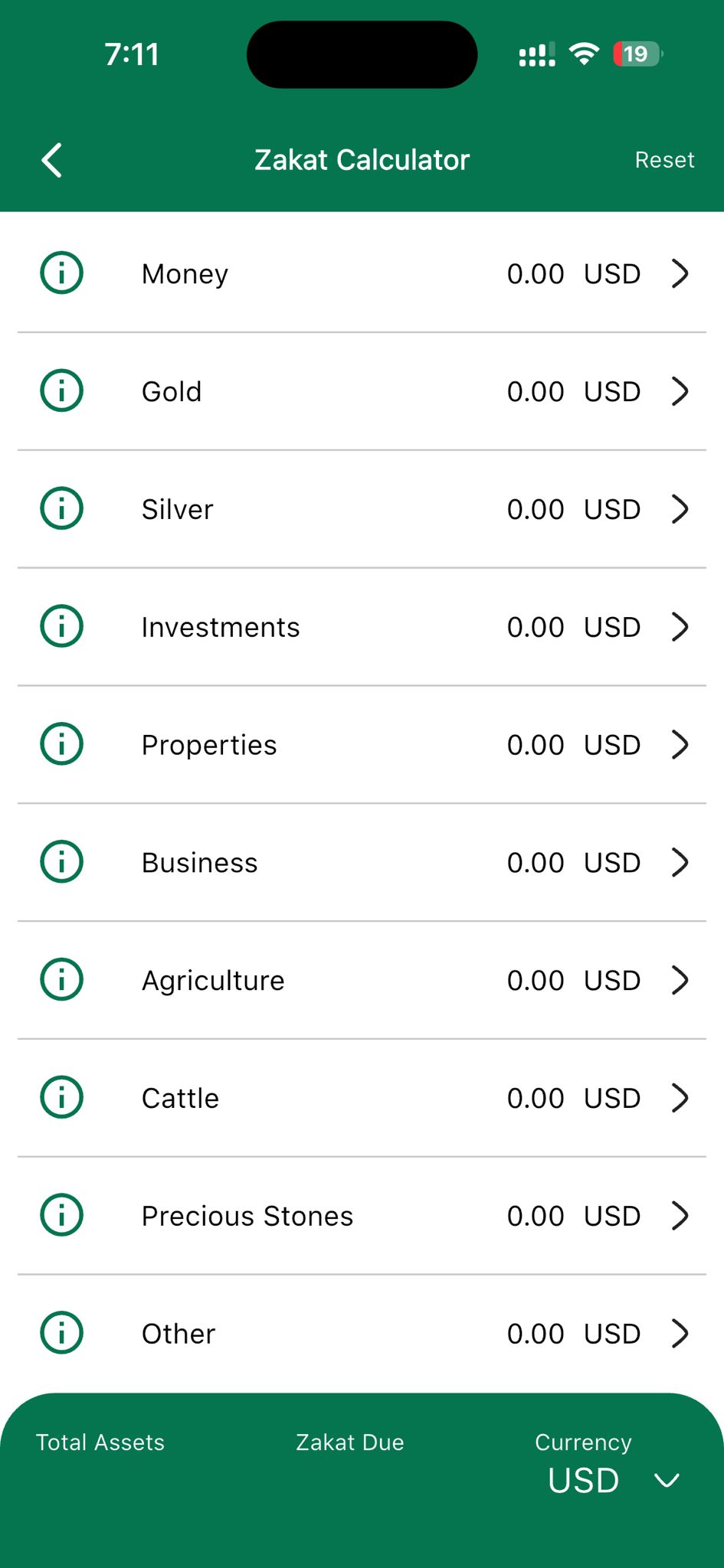
Tawhid’s Zakat Calculator lets you enter your Zakatable assets in ten categories: Money, Gold, Silver, Investments, Properties, Business, Agriculture, Cattle, Precious Stones, and Other. Each row has an info (i) icon for rules and Nisab, a value field (e.g. 0.00 USD), and an arrow to open a detail screen. The bottom bar shows Total Assets and Zakat Due, and a Currency selector (e.g. USD) that opens a searchable list of currencies. Use Reset in the header to clear all inputs. This guide explains every step.
Why Use a Zakat Calculator
Zakat is one of the five pillars of Islam—an obligation on eligible Muslims who meet the Nisab (minimum threshold) to give 2.5% of their Zakatable wealth each lunar year. Calculating Zakat correctly means including all relevant assets (cash, gold, silver, investments, business assets, etc.) and excluding what is not Zakatable (e.g. personal use, debts). Tawhid’s Zakat Calculator organizes assets by category, applies the correct rules, and shows Total Assets and Zakat Due in your preferred currency so you can fulfill this duty with confidence.
Step 1: Opening the Zakat Calculator
To access the Zakat Calculator in Tawhid:
- Open the Tawhid app and go to the Zakat Calculator section
- You will see the Zakat Calculator screen with a green header: Back arrow (left), title Zakat Calculator (center), and Reset button (right)
- Below the header is the list of asset categories; at the bottom, a green bar shows Total Assets, Zakat Due, and Currency
Step 2: Asset Categories (Money, Gold, Silver, and More)
The calculator divides Zakatable wealth into clear categories. Each category appears as a row with an info icon, the category name, a value (e.g. 0.00 USD), and an arrow to enter or edit details.
List of Categories
- Money: Cash at home, in bank accounts, and equivalent (savings, checking)
- Gold: Gold held as wealth (e.g. bullion, coins, jewelry above personal use)—subject to Nisab and Zakat rules for gold
- Silver: Silver held as wealth—subject to Nisab and Zakat rules for silver
- Investments: Stocks, funds, bonds, and other financial investments held for growth
- Properties: Real estate or property held for investment or sale (not primary residence for personal use)
- Business: Business assets, inventory, and capital used in trade or business
- Agriculture: Crops and produce subject to Zakat (rules may vary by type and irrigation)
- Cattle: Livestock (e.g. camels, cattle, sheep/goats) held for a full year above Nisab
- Precious Stones: Gems and precious stones held as wealth (e.g. diamonds) where applicable
- Other: Any other Zakatable assets not covered above
Entering Values
- Tap a row (or the arrow) to open the detail or input screen for that category
- Enter the value in the currency shown (e.g. 0.00 USD). You can enter amounts for each sub-item if the app supports it
- The main list will show the total for that category (e.g. 0.00 USD) and the bottom bar will update Total Assets and Zakat Due (typically 2.5% of qualifying assets above Nisab)
Info Icon (i)
Each category has an info (i) icon—usually in a circle—on the left. Tapping it opens a short explanation or tooltip for that asset type, including:
- What counts as Zakatable for that category
- Relevant Nisab or conditions (e.g. gold/silver Nisab)
- Any exceptions or scholarly notes
Use these tips to enter your assets correctly and avoid under- or over-paying Zakat.
Step 3: Total Assets and Zakat Due (Bottom Bar)
The bottom bar stays visible so you always see the result of your entries.
- Total Assets: Sum of all Zakatable assets you entered (in the selected currency)
- Zakat Due: The amount of Zakat owed—usually 2.5% of the total (or the app may apply Nisab first so Zakat is only on wealth above the threshold)
- Values update as you add or change amounts in any category
Step 4: Selecting a Currency
Zakat can be calculated in your local currency. Tawhid supports many currencies so you can enter and view amounts in USD, GBP, AED, PKR, or others.
How to Change Currency
- In the bottom bar, tap Currency (e.g. “USD” with a down arrow)
- A Select a Currency modal opens with a search bar and a scrollable list
- Search: Type in the search box (e.g. “dollar”, “pound”, “riyal”) to find a currency quickly
- List: Each row shows the full name and code (e.g. Afghan Afghani (AFN), Albanian Lek (ALL), Australian Dollar (AUD), US Dollar (USD)) with an arrow to select
- Tap a currency to select it; the modal closes and the calculator will use that currency for display and possibly for conversion if you enter values in different units
Step 5: Reset Button
If you want to clear all inputs and start a new calculation:
- Tap Reset in the top-right of the Zakat Calculator header
- All category values are typically set back to zero (or blank)
- Total Assets and Zakat Due will reset accordingly
- Currency selection is usually kept so you don’t have to reselect it
💡 Pro Tip
Calculate Zakat once per lunar year (e.g. at Ramadan). Use the info icons to confirm which assets are Zakatable and what Nisab applies. If you hold assets in multiple currencies, choose one base currency (e.g. USD) and convert others at a consistent rate, or use the app’s currency if it supports conversion.
Best Practices for Zakat Calculation
- Include all Zakatable wealth: Cash, gold, silver, investments, business assets, and other categories that apply to you
- Exclude what is not Zakatable: Primary residence, personal use items, immediate debts—use the info icons to check
- Use one valuation date: Calculate everything as of the same day (e.g. your Zakat due date) for consistency
- Check Nisab: If your total is below the Nisab threshold, no Zakat is due; the app may show 0 or indicate this
- Choose the right currency: Select the currency you think in or give in, so Zakat Due is easy to pay
- Reset for a new year: When the next Zakat year comes, use Reset and re-enter your current assets
Common Questions
What is Nisab?
Nisab is the minimum amount of wealth above which Zakat is due. It is often defined in terms of gold or silver (e.g. equivalent to 85 grams of gold or 595 grams of silver). If your total Zakatable assets are below Nisab for a full lunar year, no Zakat is due. Tawhid’s calculator and info tips help you apply the Nisab correctly.
Is Zakat 2.5% of everything?
Zakat is typically 2.5% of Zakatable wealth that has been held for one lunar year and is above Nisab. Not everything you own is Zakatable—personal use items, primary home, and certain other assets are excluded. The app’s categories and info icons guide you on what to include.
Can I use a different currency?
Yes. Tap Currency in the bottom bar, then choose from the “Select a Currency” list (e.g. USD, GBP, AED, AFN, AUD). You can search by name or code. All amounts are then shown in that currency.
Conclusion
Tawhid’s Zakat Calculator gives you a clear way to list your assets by category (Money, Gold, Silver, Investments, Properties, Business, Agriculture, Cattle, Precious Stones, Other), see Total Assets and Zakat Due, and switch currency with a searchable list. Use the info icons to stay aligned with Zakat rules and Nisab, and Reset when starting a new calculation. Fulfilling Zakat is a pillar of Islam—this guide and the app help you do it correctly and with ease.
Ready to Calculate Your Zakat?
Download Tawhid app and use the Zakat Calculator for Money, Gold, Silver, Investments, and all other categories in your currency.
Related Articles
Ramadan 2026: Suhoor, Iftar & Ashra Duas
Many give Zakat in Ramadan; pair with Ramadan timings and duas.
Read more →
Essential Duas: Morning, Evening & More
Duas for barakah and gratitude alongside Zakat.
Read more →
How to Set Up Accurate Prayer Times
Prayer times and Azan for your daily worship.
Read more →
Complete Guide to Reading Quran
Quran, Zakat, and the five pillars in one app.
Read more →
Islamic Events & Hijri Calendar
Timeline of Ramadan, Eid, Isra Miraj, Laylat al-Qadr with Gregorian & Hijri dates.
Read more →